NetToolkit v2.3
A free Windows tool that resets your network (DNS, Winsock, TCP/IP and adapters) and opens the right Call of Duty ports for Steam and Battle.net. Everything is in one small app with no install.
Download NetToolkit.exe or download from Mega.nz
Version 2.3 · 160 KB · Released 14 November 2026 · Windows 10 / 11 · Source code coming soon to GitHub

NetToolkit replaces a pile of batch files and command-line tricks. Every step is labelled, and nothing runs until you click.
Network Reset
Choose steps one by one or use a preset:
- Quick: flush DNS, NetBIOS and ARP caches, then renew your IP.
- Full: also resets proxy, Winsock and TCP/IP and restarts adapters. Your saved Wi-Fi networks stay.
- Deep: also deletes saved Wi-Fi networks and runs a full Windows network reset.
Game Ports
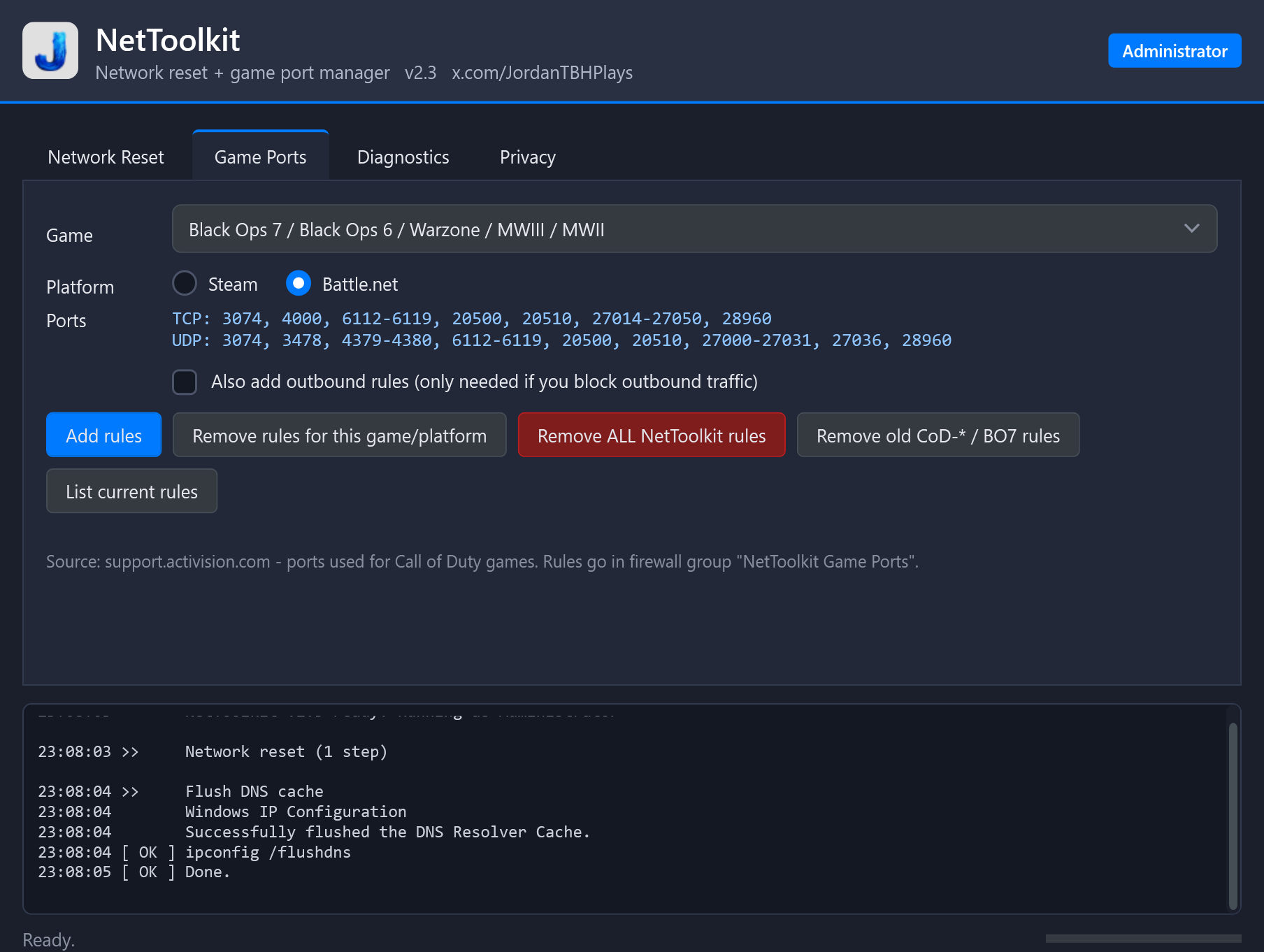
Pick a Call of Duty game and Steam or Battle.net. NetToolkit adds the matching Windows Firewall rules. It also removes them cleanly when you no longer need them.
- Only 2–4 tidy rules per game, not dozens.
- Re-adding never makes duplicates.
- Cleans up rules from older CoD firewall scripts.
Diagnostics
- Adapter, IP, gateway and DNS info.
- Ping test to your router, Cloudflare and Google.
- DNS lookup timings for Battle.net, Steam and CoD.
- Save the log to share when asking for help.
Safer than the old batch files
Restarts only physical adapters, so ZeroTier, VPN and virtual adapters are left alone. Steps that can't be undone ask before they run. The app asks for Administrator rights when it opens, so it never half-runs without them.
There's nothing to install. It's one portable .exe.
- Download
NetToolkit.exeand save it anywhere. A USB stick works too. - Double-click it and click Yes on the Windows admin (UAC) prompt.
- If Windows shows "Windows protected your PC", click More info, then Run anyway. Here's why that appears.
- Pick a preset or tick the steps you want, then click Run selected.
- Reboot if you ran Winsock, TCP/IP or the Windows network reset. The app tells you when a reboot is needed.
Requirements: Windows 10 or 11 and Administrator rights. Nothing else is needed, because the app uses Windows PowerShell 5.1 and .NET Framework 4, which are built into Windows.
Tip: start with Quick. Move to Full if problems continue. Keep Deep as a last resort, because it deletes saved Wi-Fi passwords and VPN adapters.
"Windows protected your PC" (SmartScreen)
NetToolkit is not code-signed. A signing certificate costs money each year, and this is a free hobby project. Windows warns about any unsigned app that few people have downloaded yet. The warning means "unknown publisher". It doesn't mean malware was found. Click More info, then Run anyway.
Antivirus false positives
NetToolkit is a PowerShell script packed into an .exe with the open-source tool PS2EXE. Some malware is packed the same way. Some antivirus engines therefore flag any PS2EXE app by pattern, without checking what it does. The app also asks for admin, changes network settings and edits firewall rules, and heuristic scanners treat that as suspicious. Expect a few hits on VirusTotal. They are generic detections, such as "Heur", "Generic" or "Wacatac", not a known threat.
Check the file yourself
Compare your download's SHA-256 hash with this one. If they match, the file is exactly the one published here.
2D2FEC1B0A16CF4DC6781017A104538178F1D819047C48B25BAE719A00D45FEF
To get your file's hash, run this in PowerShell: Get-FileHash .\NetToolkit.exe
- Upload the file to VirusTotal and read which engines flag it, and why.
- The full source code (
NetToolkit.ps1) is coming to GitHub. You'll be able to read every line, or run the script directly with no .exe. - Only download NetToolkit from this page, the Mega.nz link above. Both downloads are the same file and have the same hash. Copies from anywhere else may have been modified.
Port lists come from Activision's official page: Ports used for Call of Duty games. Its "PC" rows are Battle.net.
| Game | Platform | TCP | UDP |
|---|---|---|---|
| Black Ops 7 / Black Ops 6 / Warzone / MWIII / MWII | Steam | 3074, 27015, 27036 | 3074, 27015, 27031-27036 |
| Battle.net | 3074, 4000, 6112-6119, 20500, 20510, 27014-27050, 28960 | 3074, 3478, 4379-4380, 6112-6119, 20500, 20510, 27000-27031, 27036, 28960 | |
| Vanguard | Battle.net | 3074, 27014-27050 | 3074-3079 |
| Black Ops Cold War | Battle.net | 3074, 27014-27050 | 3074-3079 |
| Modern Warfare (2019) | Battle.net | 3074, 27014-27050 | 3074, 3478, 4379-4380, 27000-27031, 27036 |
| Black Ops 4 | Battle.net | 3074, 27014-27050 | 3478, 4379-4380, 27000-27031, 27036 |
| WWII | Battle.net | 3074, 27015-27030, 27036-27037 | 3074, 4380, 27000-27031, 27036 |
| Infinite Warfare | Battle.net | 3074, 27015-27030, 27036-27037 | 3074, 4380, 27000-27036 |
| Modern Warfare Remastered | Battle.net | 3074, 27015-27030, 27036-27037 | 3074, 4380, 27000-27036 |
| Black Ops III | Battle.net | 3074, 27014-27050 | 3478, 4379-4380, 27000-27031, 27036 |
| Advanced Warfare | Battle.net | 27014-27050 | 3478, 4379-4380, 27000-27031, 27036 |
| Ghosts | Battle.net | 1116-1150, 28910 | 1116-1150, 3074, 5165, 27900-27901 |
| Black Ops II | Battle.net | 3074, 27014-27050 | 3074, 3478, 4379-4380, 27000-27030 |
Windows Firewall rules only affect your PC. If your NAT type is still Strict or Moderate, you may also need port forwarding or UPnP on your router.
NetToolkit v2.3 · Last updated 14 November 2026. The same policy is shown in the app's Privacy tab.
Summary
NetToolkit runs entirely on your PC. It does not collect, store, sell or send any personal data. It has no account, telemetry, analytics, advertising or automatic update check.
What the app changes on your PC
The app only runs the steps you choose:
- DNS, NetBIOS and ARP caches
- Your DHCP lease (your IP address)
- WinHTTP proxy settings
- Winsock and TCP/IP settings
- Network adapters
- Saved Wi-Fi profiles (Deep reset only)
- Windows Firewall rules in the group "NetToolkit Game Ports"
Nothing runs until you click a button. Steps that can't be undone ask for confirmation first.
Network traffic the app causes
The app never contacts a NetToolkit or developer server. Some actions do create normal network traffic:
- Release / renew IP talks to your router's DHCP server.
- Connectivity test pings your router, 1.1.1.1 (Cloudflare) and 8.8.8.8 (Google).
- DNS lookup test asks your DNS server to look up battle.net, store.steampowered.com, callofduty.com and microsoft.com.
Those third parties see only what any ping or DNS lookup shows: your public IP address and the request itself. Their own privacy policies apply.
Logs
The activity log stays in memory and is deleted when you close the app. It is only saved if you click Save log to Desktop. A saved log can contain your PC name, adapter names, local IP addresses and DNS servers, so check it before sharing it publicly.
Administrator rights
Administrator rights are only used to change network and firewall settings, and for nothing else.
This website
NetToolkit doesn't use this website to collect anything. Like any website, the web host may log standard request data, such as your IP address and browser type, when you visit or download.
Changes and contact
If this policy changes, the new version ships with the next release and the date above is updated. For questions, contact @JordanTBHPlays on X.
Will this delete my Wi-Fi passwords?
Only if you tick Delete ALL saved Wi-Fi profiles or use the Deep preset. Quick and Full keep them. The app asks you to confirm before it deletes anything.
Do I need to reboot?
You need to reboot after Winsock reset, TCP/IP reset or Windows network reset. The log tells you, and the app has a Reboot button. DNS, ARP and the IP renew take effect right away.
How do I undo the firewall rules?
Open the Game Ports tab and click Remove rules for this game/platform or Remove ALL NetToolkit rules. Every rule is in the firewall group "NetToolkit Game Ports", so you can also find and remove them in Windows Defender Firewall with Advanced Security.
I used the old "COD Firewall Manager" or the BO7 PowerShell commands. Do I need to clean up?
Click Remove old CoD-* / BO7 rules in the Game Ports tab. It removes the rules those older tools created, so you don't have duplicates.
Will it break my VPN or ZeroTier?
Restarting adapters only touches physical adapters (Ethernet and Wi-Fi). The Windows network reset step in Deep mode removes and reinstalls all adapters, VPN ones included. You may need to reinstall or reconnect your VPN after it.
Will opening ports fix my NAT type?
Sometimes. Windows Firewall rules stop your PC from blocking game traffic. Strict or Moderate NAT is usually set by your router, though. If NAT stays the same, enable UPnP or forward the same ports on your router.
Does it work on Xbox or PlayStation?
No. NetToolkit is a Windows app. Console port lists are on Activision's support page and go on your router.
NetToolkit is free to use and is provided "as is", without warranty of any kind. It changes system network settings. Use it at your own risk.
Not affiliated with or endorsed by Activision, Blizzard Entertainment, Battle.net, Valve or Steam. Call of Duty, Battle.net and Steam are trademarks of their respective owners.
